
windows下安装openclaw
·
首先下载nodejs:https://nodejs.org/en/download
下载好后进行安装(如果本地有,可能安装不成功可能是因为版本太低导致,直接下载高版本);
不要装在全局 -g,改成本地安装:
- 新建一个空文件夹,比如
D:\openclaw-test - 在里面打开管理员终端,运行:npm init -y
-
安装时跳过会崩溃的编译脚本:npm install openclaw@latest --ignore-scripts(
--ignore-scripts是关键,直接跳过崩掉的node-llama-cpp编译) - npm install -g openclaw@latest --ignore-scripts --unsafe-perm=true
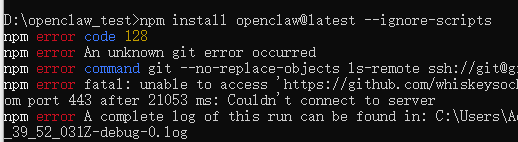
- 如果有以上报错证明GitHub 连接失败下面是解决方案:
- # 强制 git 使用 https 代替 git/ssh 协议 :git config --global url."https://github.com/".insteadOf git@github.com:
- 在运行 git config --global url."https://".insteadOf ssh://
- # 重新执行你的安装命令 npm install openclaw@latest --ignore-scripts
- 以上操作执行完毕,您的openclaw基本上就可以安装完成了!


汇聚全球AI编程工具,助力开发者即刻编程。
更多推荐

 0
0 0
0- 0


 已为社区贡献1条内容

所有评论(0)